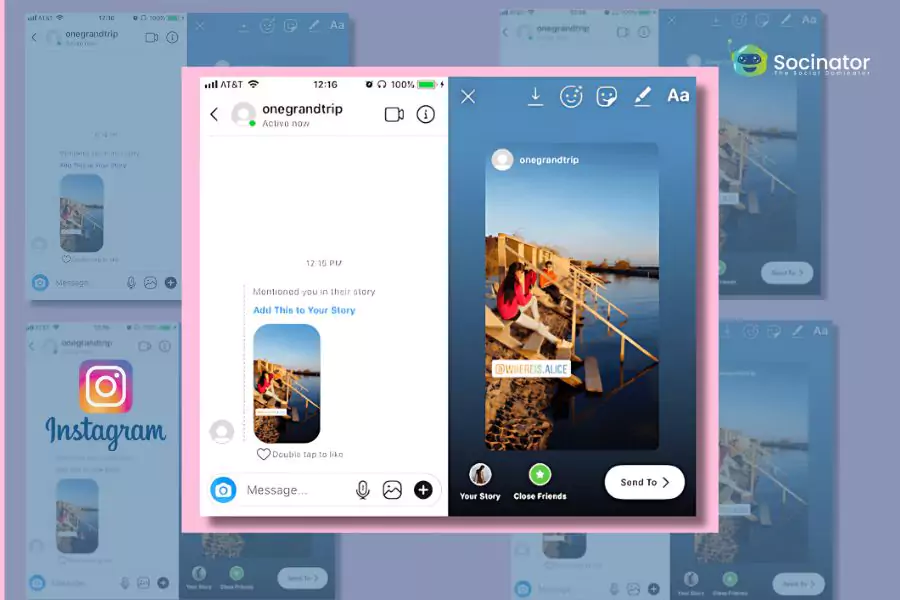
Ultimate Guide on How to Repost on Instagram
If you’ve ever come across an Instagram post that you absolutely loved and wanted to share it with your followers, you may have asked yourself, how to repost instagram? Reposting content can help you keep your feed fresh, engage with your audience, and foster community. In this guide, we will delve into the various methods of reposting on Instagram, best practices, and even applications that can help streamline the process.
/how-to-repost-an-instagram-story-featured-57a148cfac4d446692ce77311ddc8df2.jpg)
Understanding the Basics of Reposting
Reposting on Instagram refers to sharing someone else’s content on your profile. It’s a way to give credit to the original poster and share content that resonates with you. However, there are a few ethical considerations and practical steps to keep in mind, so let’s break it down.
Why Repost?
Reposting can be advantageous for several reasons:
- Engagement: Sharing relevant content can boost your interaction rates.
- Community building: It shows that you value the work of others and fosters a sense of community.
- Content Variety: It allows you to share diverse content types without creating everything yourself.
Methods to Repost on Instagram
There are multiple ways to repost content on Instagram, each with its own steps and best practices. Here are the most common methods:
1. Manual Reposting
This is the simplest method, though it requires a bit more effort. Follow these steps:
- Take a screenshot of the post you want to share.
- Crop the image to remove any unwanted aspects, like the frame or profile information.
- Open Instagram and select the ‘+’ icon to create a new post.
- Upload the cropped image, add your caption, and tag the original poster.
- Share it!
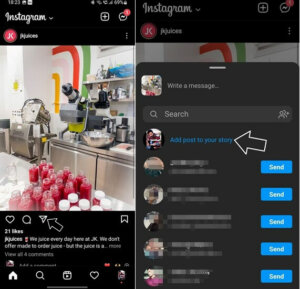
2. Using Instagram’s Share Feature
You can directly share posts through Instagram’s built-in features:
- Click on the paper airplane icon below the post.
- Select “Add post to your story.”
- Edit the story if necessary, then share it with your followers.
This method allows you to share content without permanently adding it to your profile.
3. Reposting Apps
Several apps make reposting seamless:
- Repost for Instagram: This app allows you to share posts while giving credit to the original poster.
- Regrann: It provides options to repost images and videos, and you can even download them to your phone.
- RepostMe: A user-friendly app that allows reposting posts and stories with ease.
To use these apps, follow these basic steps:
- Download and install the reposting app of your choice.
- COPY the URL of the post you want to repost.
- Open the reposting app and select the post you want to share.
- Customize your caption and credits as needed, then share it via Instagram.
Best Practices for Reposting
When reposting content, it is essential to follow some best practices to maintain goodwill and effectiveness:
- Always give credit: Tag the original poster in your caption or the post itself.
- Ask for permission: When appropriate, reach out to the content creator for permission to repost their work.
- Choose relevant content: Ensure that the content you are reposting aligns with your brand’s values and resonates with your audience.
- Engage with the original creator: Like, comment, and share their content outside of reposting.
Understanding Instagram’s Guidelines
Always be aware of Instagram’s community guidelines regarding content sharing. Copyright infringement could potentially lead to your post being taken down or, in worst-case scenarios, the suspension of your account. When in doubt, err on the side of caution and seek permission.
Conclusion
Reposting on Instagram can be an effective way to keep your content fresh and engage with your audience. However, it is crucial to approach reposting thoughtfully and ethically. Whether you choose manual methods or utilize apps like the ones mentioned, ensure that you honor the original creators of the content you share. With these tips, you can effectively leverage reposting as a powerful tool for your Instagram strategy.
Explore the various methods of reposting and remember to always respect the original creators’ work. Happy reposting!